Transition Rules
Define the rules that govern how members move between member types — who can request it, who must approve it, and what documents are required.
Transitions are how members change from one member type to another within your organization. A New Member becoming a Full Member, a Full Member moving to Honorary status, or a Seedling advancing to Apprentice — these are all transitions. Each transition needs clear rules about who can initiate it, who must sign off, and what documentation must accompany the request.
The Transitions admin page lets you define one or more transition rules. Each rule specifies the allowed path from one set of member types to a target type, along with the approval chain and required attachments.
How Transitions Work
A transition is a controlled change of a member's type. Unlike simply editing a member's type directly, transitions follow a structured workflow:
- An administrator at the permitted level requests the transition for a specific member.
- The system checks whether a matching transition rule exists for the member's current type and the requested target type.
- The requestor uploads any required attachments and provides a message if the rule requires one.
- The request is routed to administrators at the approver level for review.
- Once approved, the member's type is automatically changed to the target type, and all associated permissions update immediately.
If no transition rule exists for a given from/to combination, that transition simply cannot be requested. This ensures that all type changes follow your organization's defined processes.
Reading the Transition Rules Table
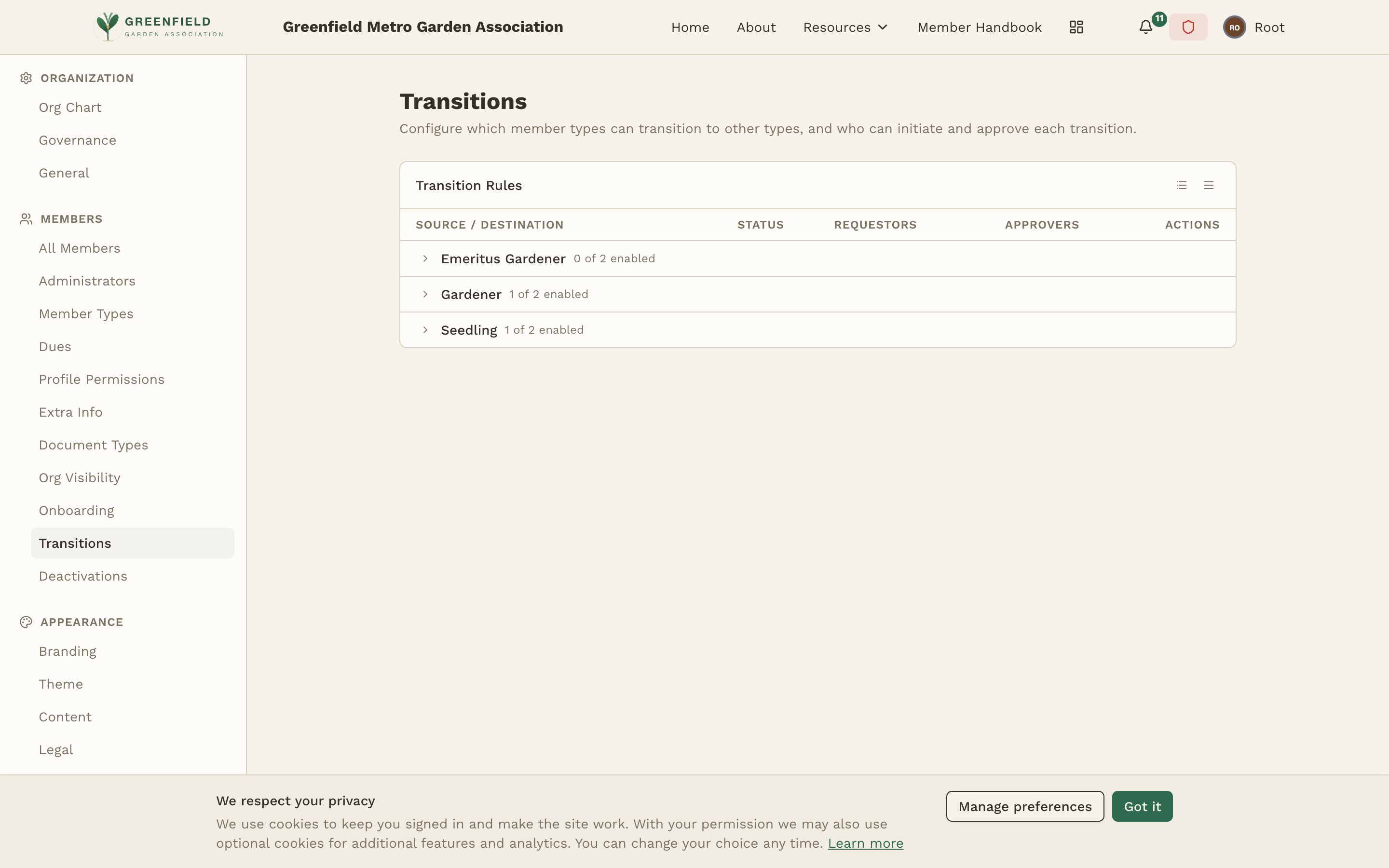
The page shows a single Transition Rules table with columns: Source / Destination, Status, Requestors, Approvers, and Actions. Rules are grouped by source member type — each source type expands to show every rule that starts from it, with a header like "Gardener 1 of 2 enabled" telling you how many of the rules under that source are currently active.
Each rule has a source member type (where the member is now), a destination member type (where they're going), an active/inactive status, the requestor levels that can initiate it, and the approver levels that must sign off.
Creating a Transition Rule
Use the add control on the Transitions page to open the rule editor. A rule has these fields:
Source Member Type
Select the member type that is the starting point for this transition (e.g. "Seedling"). Each rule has exactly one source type. If multiple source types should advance to the same destination (e.g. both "Seedling" and "Probationary" should be able to become "Gardener"), create one rule per source.
Destination Member Type
Select the destination type that members will transition into (e.g. "Gardener"). Each rule has exactly one destination type.
Requestors
Choose which administrative levels are allowed to initiate this transition. The available levels are:
- Club Admin — The top-level site administrators. Can initiate transitions for any member in the organization.
- Org Admin — Regional or mid-level administrators. Can initiate transitions for members in sub-orgs below their org. The Org flag does not include the org itself — to also cover their own org, the role needs both Org and Local flags.
- Local Admin — Chapter-level administrators. Can initiate transitions only for members in their specific chapter.
You can select multiple requestor levels. For instance, allowing both Club and Org admins to request a transition gives more flexibility while keeping the process controlled.
Approvers
Choose which administrative levels must approve the transition before it takes effect. The same three levels are available (Club, Org, Local). When a transition is requested, it appears in the pending requests queue for administrators at the approver level.
A common pattern is to let local administrators request transitions but require org-level approval. This ensures that chapter officers can advocate for their members while regional leadership maintains oversight.
Required Attachments
Specify which document types must be uploaded with the transition request. The dropdown shows attachment types you've configured in the Attachment Types section. For example, you might require:
- A Sponsorship Letter for new member advancement
- A Background Check clearance document
- A Service Record for honorary member nominations
- A Transfer Form for cross-chapter transitions
Required attachments ensure that proper documentation accompanies every type change. The requestor cannot submit the transition without uploading all required documents.
Message Requirements
Configure whether the requestor must include a written message with the transition request:
- Not required — The message field is available but optional.
- Required — The requestor must write a message before submitting. When required, you can also set custom prompt text that appears as placeholder text in the message field, guiding the requestor on what to include.
For example, a transition to Full Member might use the prompt: "Please describe why this member should advance, including their participation history and any sponsorship details." This helps ensure that approvers receive the context they need to make a decision.
Managing Transition Rules
All your transition rules live in the Transition Rules table on the page, grouped by source member type. Each row shows the source → destination, whether the rule is currently enabled, the requestor and approver levels, and per-row Edit / Delete actions. Use the row's controls to modify or remove a rule.
Disabling a rule (toggling its Status off) leaves it in place but prevents new requests from using it. Deleting a rule does not affect transitions that have already been completed.
If you have pending transition requests and you modify the rule, existing pending requests continue under the original rule. Only new requests use the updated rule. This prevents in-flight requests from being disrupted by configuration changes.
Common Transition Patterns
Here are some typical transition configurations used by organizations on fellos:
Progressive advancement
Seedling to New Member to Full Member. Each step has its own rule with increasingly strict requirements — the first might only need a local admin request with no attachments, while the second requires org-level approval and a sponsorship letter.
Honorary recognition
Full Member to Honorary Member. Typically requires org or club-level request, club-level approval, and supporting documents like a nomination letter and service record.
Probation or suspension
Full Member to Probationary. May require local admin request, org-level approval, and a written explanation of the circumstances. This creates an auditable record of disciplinary actions.
Reinstatement
Probationary back to Full Member. Requires documentation showing the member has fulfilled reinstatement requirements. This rule would be separate from the initial advancement rule.
Think of transition rules as defining the "legal paths" through your membership lifecycle. If a path doesn't have a rule, it can't happen. Map out your desired flows on paper first, then create rules to match.
Transition History
Every completed transition is recorded in the member's profile history and in the Audit Log. This includes who requested it, who approved it, when it happened, and all attached documents. This creates a complete paper trail for every type change in your organization.