Feed Settings
Control how the activity feed behaves — how far back it looks, and which types of content appear.
The activity feed is the central hub of your fellos site. It's the first thing members see when they log in — a single stream of posts, milestones, announcements, and organizational updates. The page describes itself as "Configure the club activity feed", and it gives you three things: how much history the feed displays, which auto-generated items appear in it, and the default group for each member type's feed composer.
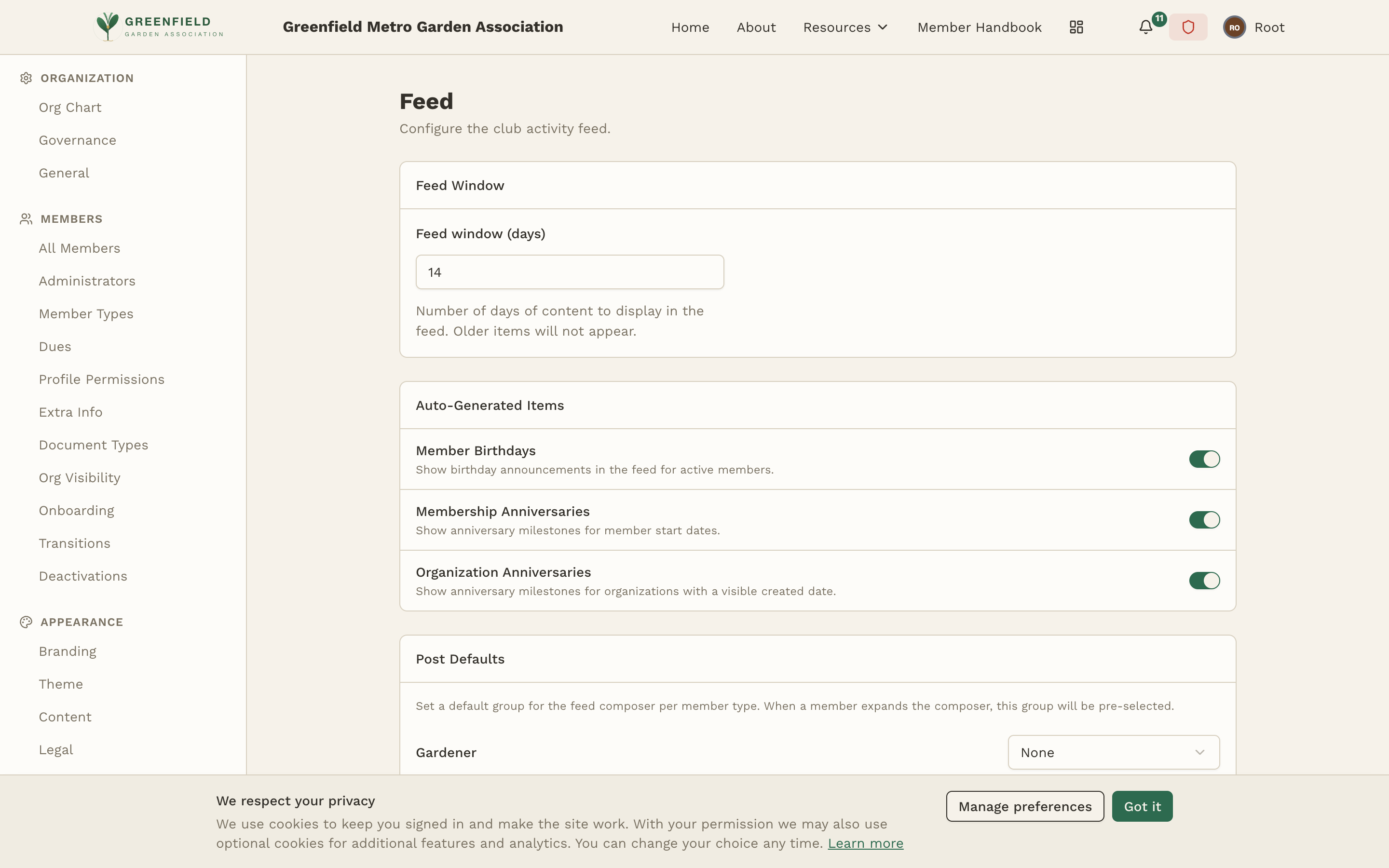
Feed Window
Feed window (days) controls how many days of content the activity feed shows. Enter a number of days — common values are 30, 60, or 90. The field's own help text puts it simply: "Number of days of content to display in the feed. Older items will not appear."
Items older than the feed window don't appear in the feed, but they are not deleted. They still exist in the system and can be found through direct links, search, or by browsing specific groups and event pages. The feed window simply controls what appears in the main feed view.
Start with 30 days. If your organization is very active with many posts per day, a shorter window keeps the feed manageable. If your organization posts less frequently, a longer window (60 or 90 days) ensures the feed doesn't feel empty.
Choosing the right window
- 30 days — Good for active organizations with multiple posts per day. Keeps the feed focused on recent activity.
- 60 days — A balanced middle ground. Works well for most organizations with moderate posting frequency.
- 90 days — Best for organizations that post less frequently or want members to see a broader history when they log in.
Auto-Generated Items
The Auto-Generated Items section controls which automatic celebration posts fellos inserts into the feed. There are four, each with its own switch — on means it shows up in the feed, off means it doesn't.
Member Birthdays
Birthday announcements for active members who have their birthday on file. Adds a personal touch and encourages members to engage with each other.
Membership Anniversaries
Anniversary milestones marking years since a member's membership start date.
Organization Anniversaries
Anniversary milestones for organizations that have a visible created date — useful for marking chapter founding anniversaries.
Secondary Member Anniversaries
In the page's own words: "Celebrate a secondary member's anniversary with their primary member (when an anniversary date is set)." The parenthetical is the condition — a secondary member with no anniversary date on file has nothing to celebrate, so turning this on is safe even when only some of them have a date.
Posts made by members in groups, RSVPs, and similar member-generated content always flow through the feed based on group access rules — they're not toggled on or off here. This page only controls the auto-generated celebration items above.
Post Defaults
The Post Defaults section lets you set, per member type, which group is pre-selected when that type expands the feed composer. This makes posting frictionless for the most common case — for example, default Seedlings to "General Discussion" so they don't need to pick a group every time.
Each row corresponds to a member type and has a dropdown of available groups. Pick the default group for that type, or leave it blank to make the member choose every time.
How the Feed Works
Understanding how the feed assembles its content helps you make better configuration decisions:
- The feed is personalized per member. Each member sees content from the groups they have access to and the organizations they belong to — two members signed in at the same moment do not see the same feed.
- The feed leads with recent activity, but it is not a strict newest-first list. Items of different ages appear next to each other, and the same activity can sit in a different position in two different members' feeds. Every card carries its own timestamp, which is what members should read to date an item. There is no ordering setting on this page, so the order is not something you configure here.
- The feed uses infinite scrolling. Members scroll down to see older items, up to the feed window boundary.
- Feed items respect group access rules. A member won't see posts from a group they don't have read access to, even if group posts are enabled in feed settings.
- Pinned posts in groups don't get special treatment in the feed — they're pinned within the group view, but appear in the feed like any other post.
Performance Considerations
A very large feed window combined with many enabled item types on an active site can result in a lot of content loading when members open their feed. If you notice the feed feeling slow:
- Reduce the feed window to 30 days
- Consider disabling auto-generated items you don't actively need (e.g. organization anniversaries)
- Review whether you have a very large number of groups — each group's posts contribute to the feed load
In most cases, the default settings work well without any performance concerns.