Why fellos
Six parts of running a club. Done better, and done right.
What other platforms do, fellos does better. And right. Members, chapters, offices, elections, discussions, documents and events on one connected record. These are the six places it shows most.
Separate parts, or one record.
Other platforms have the parts. They are separate parts.
In fellos the member, the chapter, the office, the election and the feed are one connected record, driven by the same data.
Approve a transfer. Approve a deactivation. Change a member's type. Certify an election. Each is done once, and the roster, the offices and the history reflect it in the same step.
One connected record — the member, the chapter and the office
A member changes chapters. The office they left is released in the same step.
On most membership platforms an officer title is a label — a group, a tag, a committee list — kept apart from the member's chapter and status, so when one changes someone has to remember to fix the other. When the records are separate, a title can outlast the move that should have ended it.
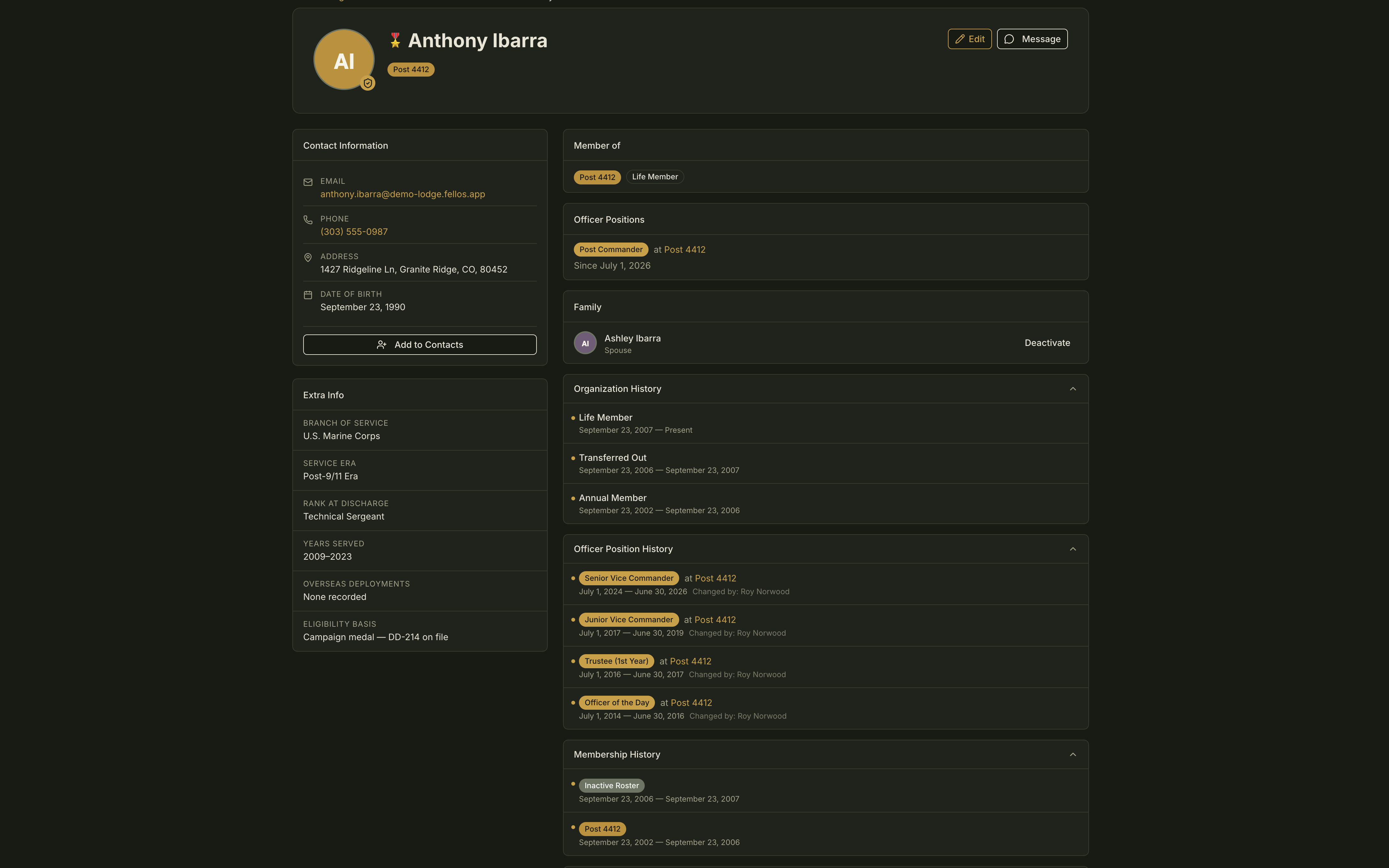
In fellos the member, the chapter and the office are one record. A member has one home organization, and every office is tied to the organization where it is held. Change any of it through an approved request or a certified election, and the rest is updated in the same act.
Transfer.
A transfer is one approved request. Once it is approved, the member's organization, directory listing and history move in one step. Any officer roles they held at the old organization are released.
Deactivation.
Voluntary leave, removal or memorial: one approved request takes the member off the active roster, revokes their login, releases any officer roles they hold and moves the record to the organization you configured. All history is kept. Nothing is deleted.
Member type.
A member type either can hold officer roles or cannot. Move a member into a type that cannot, and their existing roles are removed. The same rule is enforced at election nominations.
Certification.
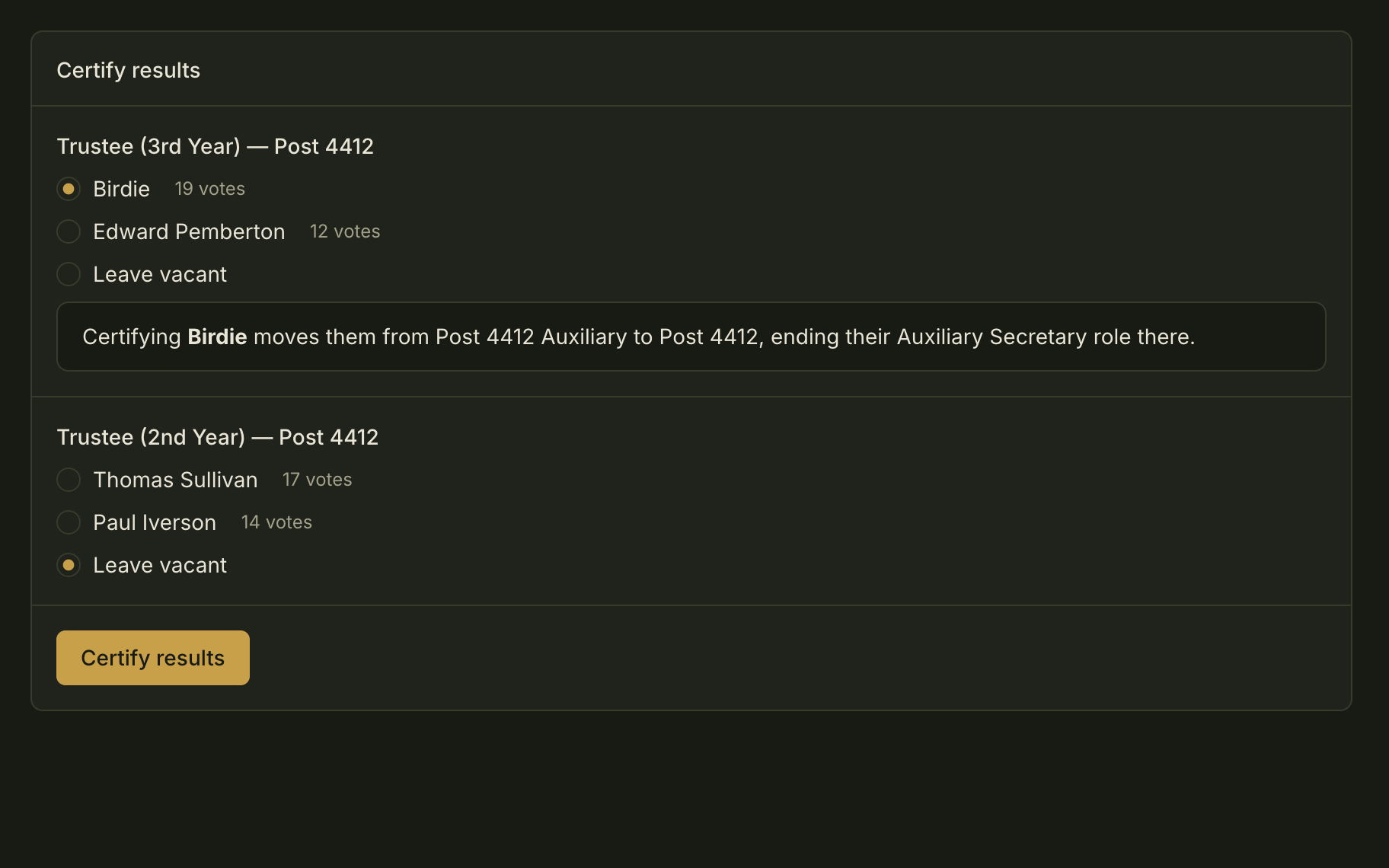
Certify an election and each winner is placed in the role and the organization they were elected to. Their roles in the organization they left end, and the outgoing officer's role ends in the same act. Elections, in full, below.
Two seats, legitimately.
One person can hold a chapter seat and a regional seat. Each is tied to its own organization, and each ends on its own: a chapter transfer releases the chapter seat and leaves the regional one alone.
History writes itself.
History tables sit on every profile — the member types a member has held, the offices they have held, every change of organization and status, every transfer. They are written as the changes are made.
The audit log.
Every administrative action — who, what, which record, when — goes into an append-only log. While your site exists, no one can edit or delete it, site admins included.
Approve a transfer
- Organization changed
- Directory listing moved
- History carried with them
- Officer roles held at the old organization, released
Elections, from nomination to seat
The election ends when the officers are in their seats.
Most platforms treat an election as a poll: it closes, you get a tally, and someone updates the officer list by hand.
Nominations, prerequisites, campaigning, ballots, election analytics and certification all happen inside fellos, run by an Election Conductor — a designation on an officer role, so your secretary can run the election without being an administrator. A conductor certifies the result, and that one act seats the winners.
1 The Election Conductor.
Running an election is a designation on an officer role. The product's own description of it: “Can set up, run, and certify elections”. Put it on the secretary's seat and the election is the secretary's to run. The conductor sets the schedule, the seats on the ballot and who may see the election: the people taking part, everyone, or specific member types and organizations. A chapter can elect its own officers while the rest of the organization follows along, view only.
2 Nominations.
Members nominate, or stand themselves. You decide who may nominate and who may second, and how many seconds a nomination needs before it reaches the ballot. Every nominee accepts or declines.
3 Prerequisites to stand.
Set, for each election, who may stand: which member types, from which organizations, and with what tenure. Tenure is three numbers — minimum days as a member, minimum days in their current member type, minimum days as an officer. An organization rule can name one organization or any organization of a type, with the organizations beneath it. Separate rules cover who votes, who can be nominated, who nominates and who seconds. The standing rule on which member types can hold office applies as well. Every nomination is checked against them.
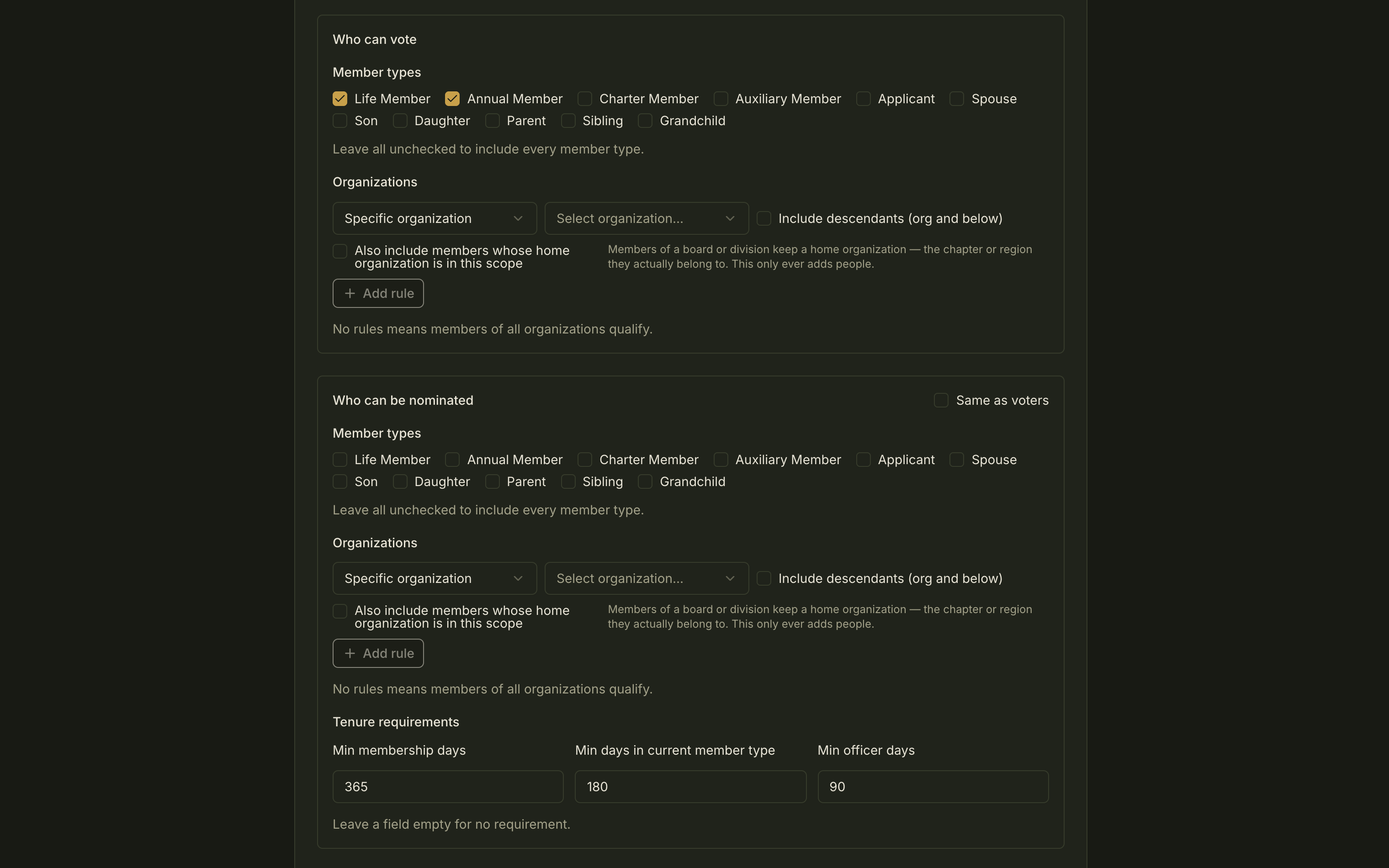
The Eligibility step of a new election: who can vote, who can be nominated, and the tenure requirements for anyone who stands.Tap the image to open it full size. 4 Campaigning.
Turn on a campaign period and candidates publish a platform. Each candidate has an open discussion thread for members' questions. It closes when voting ends.
5 Ballots.
Choose-one or ranked. One election can fill many seats across organizations, with win thresholds and run-offs. Ballots are secret — fellos shows how a member voted only to that member. Votes are final, and every voter keeps a read-only receipt of the ballot they cast.
6 Election analytics.
For the conductor: ballots cast, eligible voters, turnout and time left. Ballots over time. Turnout by organization, with the smallest organizations combined. Participation by position. Members see no running totals. After certification they see turnout, each candidate's count and percentage, and an Elected badge.
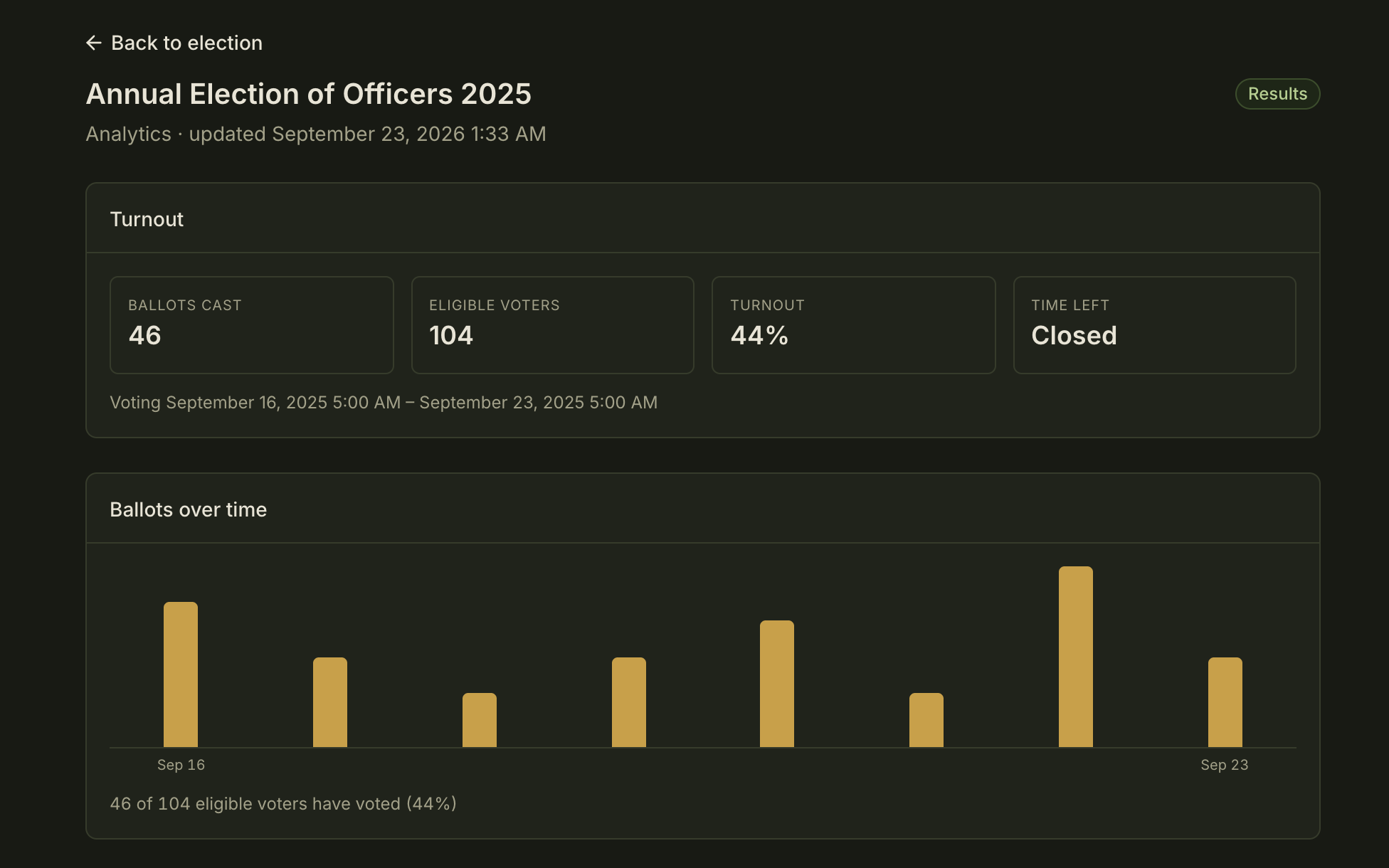
The conductor's analytics view. Members see no running totals.Tap the image to open it full size. 7 Certification.
Certification is the handover. A conductor certifies, and each winner is placed in the role and the organization they were elected to. Their roles in the organization they left end. The outgoing officer's role ends. All of it lands in the officer history on their profile, the audit log and the club feed. A seat can also be left vacant.
Certify the result, and your officers are in their seats.
Certify an election
- Winner placed in the role and the organization
- Their roles in the organization they left, ended
- Outgoing officer's role ended
- Written to the officer history on their profile
- Written to the audit log
- A card in the club feed
8 Test elections.
A test election is the entire process with the consequences switched off: hidden from members, notifications off, certified without moving anyone. And because the conductor is a role, next year's secretary inherits next year's election.
The club feed that writes itself
A feed nobody has to write.
Other platforms' feeds show whatever someone remembers to post.
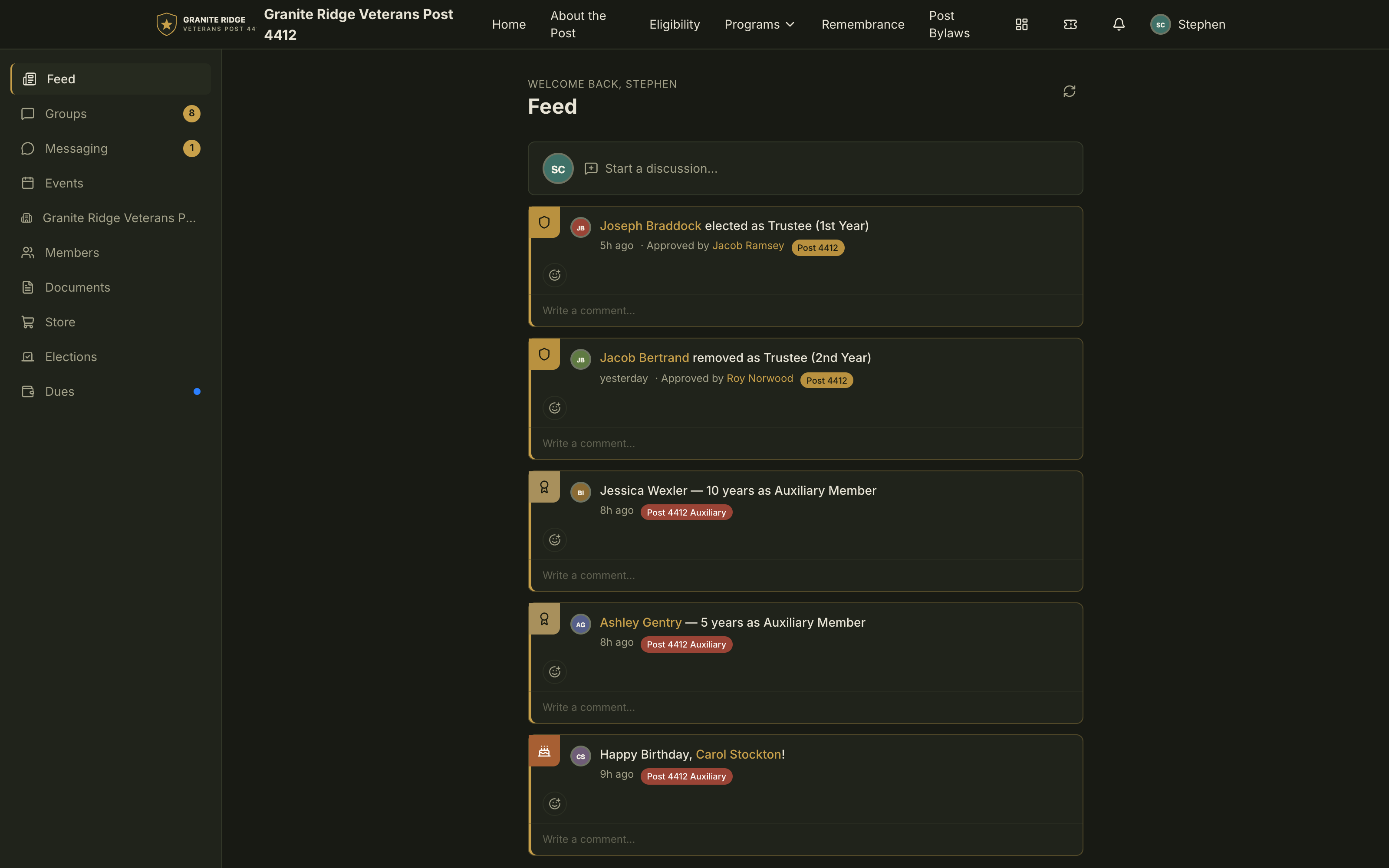
The fellos feed also writes itself, from the same record that runs the organization. It reads like a social feed: reactions and comments. Members see what is going on in their club — everything that's theirs to see.
Anniversaries and birthdays.
Membership anniversaries, organization anniversaries and birthdays arrive as cards in the feed. Nobody posts them.
Election results.
The moment a result is certified, each new officer is in the feed: a card with their name, the role and the organization.
The discussions in your groups.
They appear in the feed with comments inline.
Officer changes.
Officers elected, appointed and removed, each with the role, the organization and who approved it.
Member changes.
New members, member-type changes, transfers, members leaving and being reinstated. And, for events where the organizer turns it on, attendees as they check in.
Reactions and comments.
Congratulate the new president where you read it.
Every member's own feed.
Their chapter, their groups, their chain of command. Everything that's theirs to see, and nothing that isn't.
Do nothing
- A member's anniversary is in the feed.
- Nobody posted it.

Installs to the home screen. Opens full screen.
A notification bell with an unread count. Push notifications once your organization configures push. Digest and milestone emails that each member can switch off.
Discussions you can search — and query with AI
Years of club discussion. Search it. Or ask AI.
Plenty of platforms give you a forum and a search box.
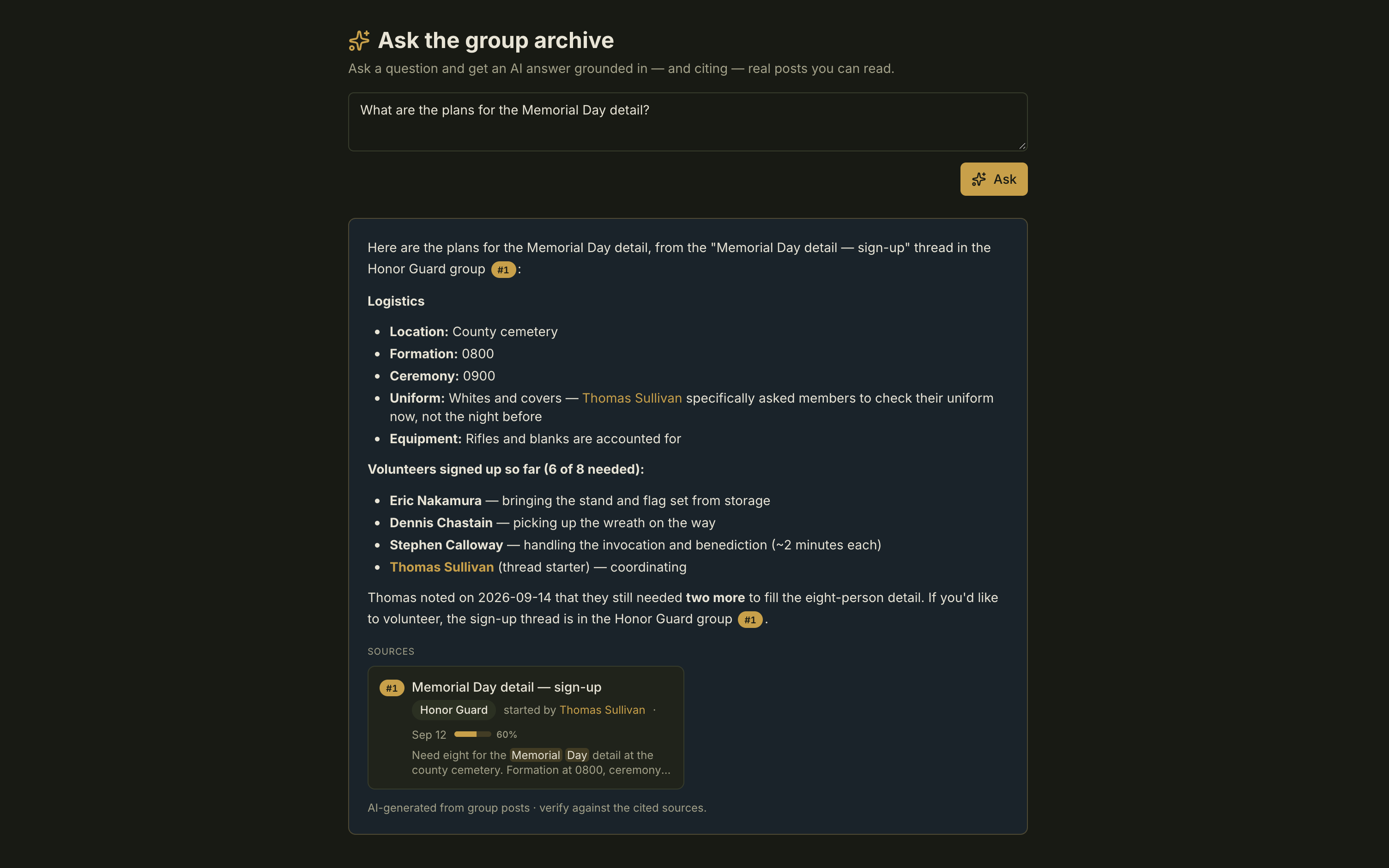
fellos lets you ask. Put a question to years of your club's own discussions with Ask AI and get in-depth research back: a written answer with the threads behind it.
Real discussion groups.
Sections, threaded topics, rich text, @mentions, link previews, inline images and signatures. Reactions and comments on every post. Moderators pin, lock, move and approve.
Rights by member type and organization.
Read, comment, post and moderate are set by member type and by organization, sub-organizations included. An officers-only group simply does not exist for anyone else.
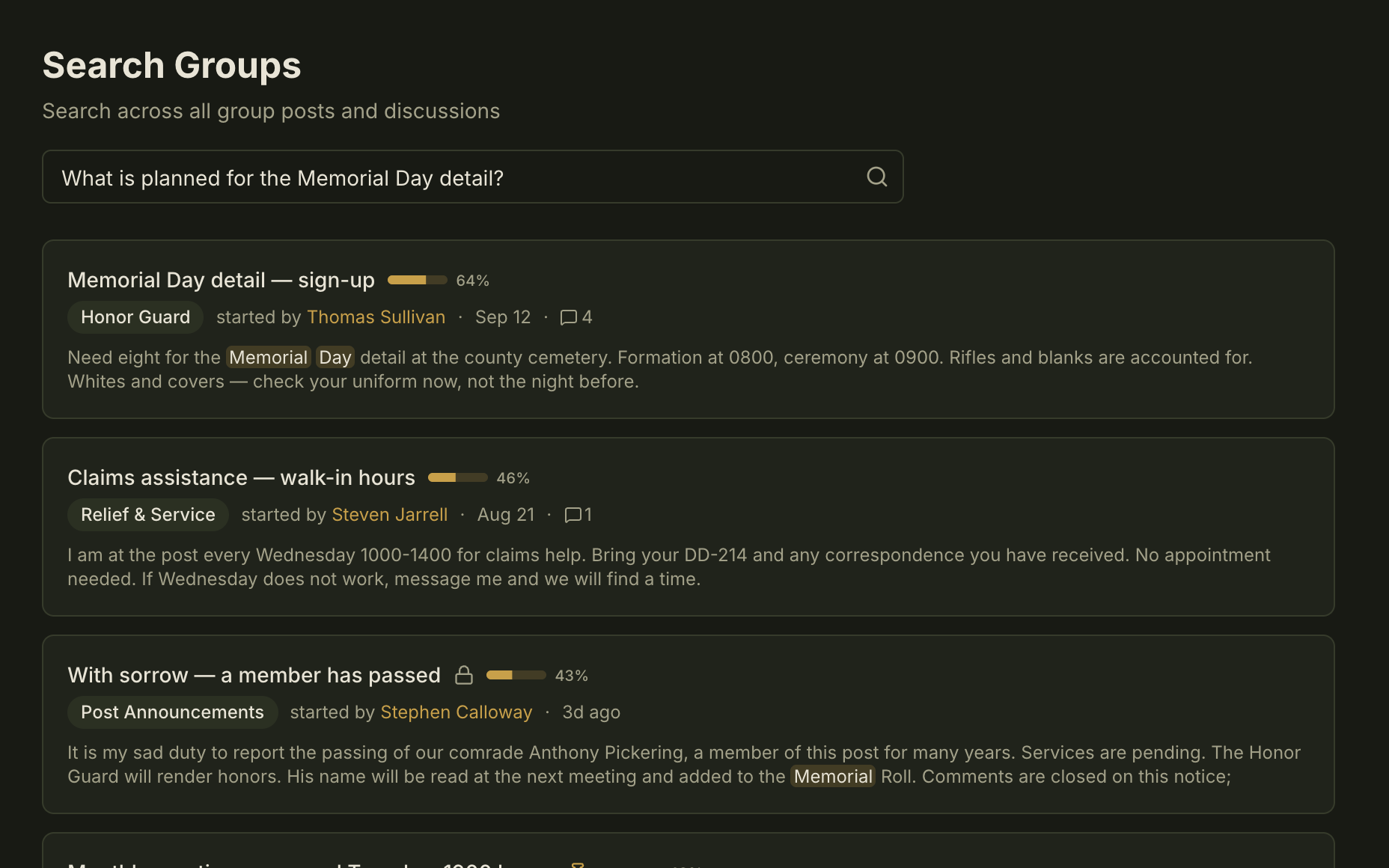
Search.
Every post and reply in every group you can see, from one box. Results are ranked by relevance with a match score. Narrow with
author:andgroup:. The box takes a question too — its placeholder reads “Ask a question or search posts...”.
A new officer wants to know what members said about moving the spring meetup, and who raised concerns.
Ask AI does the reading.
Ask AI sits beside Search on the Groups page. Put the question in your own words. It runs several searches, opens the threads and reads the replies before it answers.
Every answer shows its sources.
Numbered citations link to the posts behind the answer. When your discussions hold no answer, it says so.
It respects the room.
Ask AI draws only on groups the asking member is allowed to read, so private officer discussions stay private. AI use is written to the audit log.
Summarize.
Long thread? One tap on Summarize and any member is caught up — generated on demand, refreshed when the conversation moves on. Your organization sets how long a thread must be before the button appears.
Your discussions are never used to train AI models.
Ask a question
- Several searches run
- Threads opened, replies read
- A written answer
- Numbered citations to the posts
- Drawn only from groups you may read
- Written to the audit log
Documents that keep every revision
Replace the bylaws. Keep every version that came before.
Two years from now, someone will need to know what Article IV said the day before.
Most platforms give you a place to put files; upload a new copy and the old one is replaced.
fellos keeps every revision — who uploaded it, when, and the file itself.
A real library.
Folders, sub-folders, breadcrumbs, one-click download.
Every upload is kept.
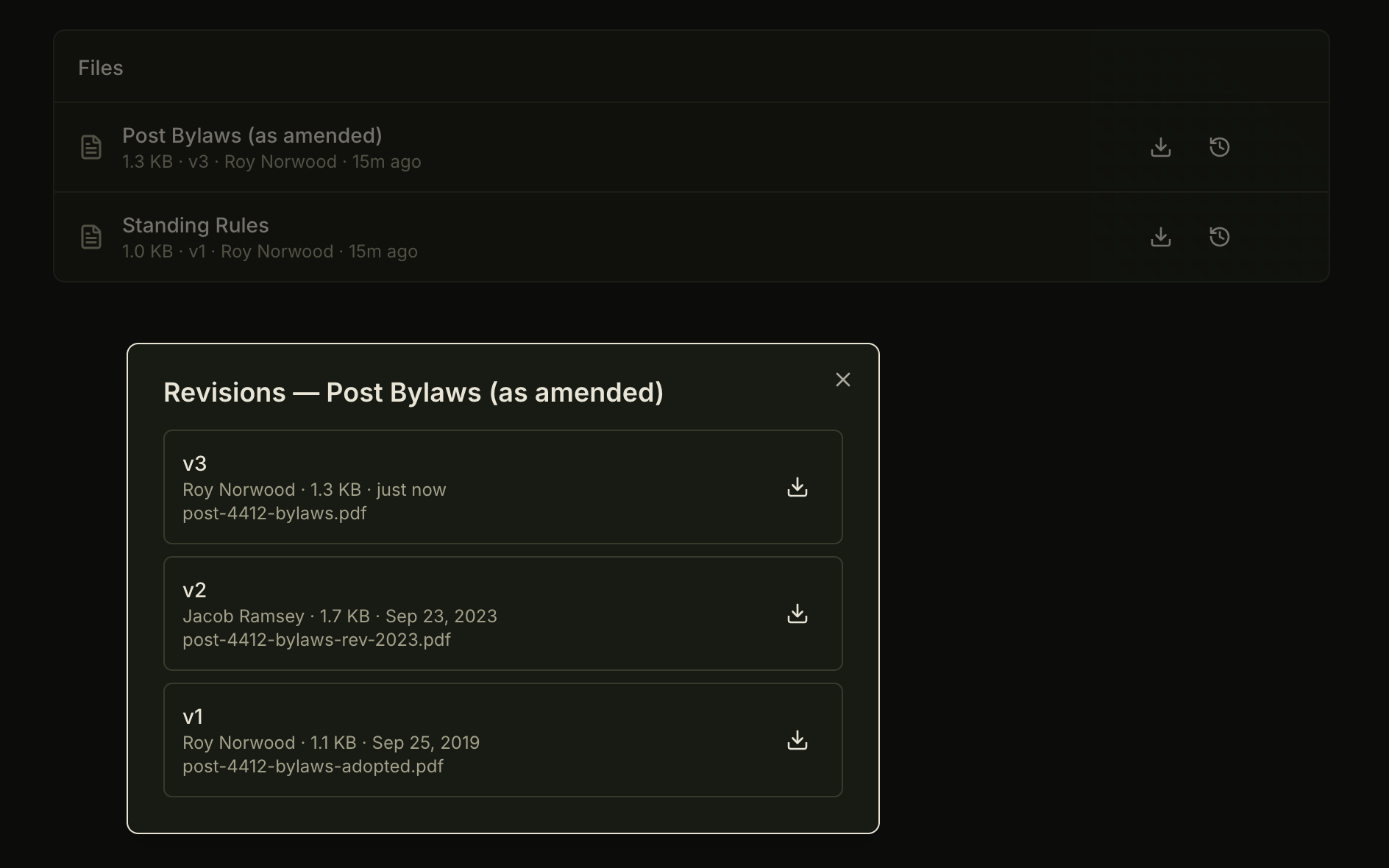
The product says it in its own words: “Every upload is kept” and, beneath it, “Replacing a file doesn't overwrite it.” Each file shows its size, the version it is on, who uploaded it and when.
The Revisions dialog.
Every version of a file, listed, each with its own download.
Control, folder by folder.
Who can see a folder at all, who can download from it, who can see its revision history. A folder a member cannot see is not in their list.
Curators follow the seat.
Curators are appointed by officer role, so the job goes with the office. Board minutes stay with the board.
Upload in bulk.
Up to 100 files at a time, 100 MB each.
Member paperwork, separately and properly.
Required documents by member type sit on each member's profile — waivers, applications, certificates — with a review step.
Upload the new bylaws
- New version number
- Uploader and date recorded
- The earlier version kept, with its own download
Events, from the calendar to the door
Scan the ticket at the door. Their ticket page says who let them in.
A member's ticket matches their member type, whoever buys it, and one code covers the party. The Comptroller runs ticketing, the door included — a designation on an officer role, so the job follows the seat. One scan and one tap check the party in, and the member's ticket page then says when, and by whom.
The club's calendar.
One month at a glance, color-coded by category, or the same events as a list. A member's own events and their tickets are a tab away, and the view narrows by category or by organization. A cancelled event stays on the calendar, struck through, with the reason on its page.
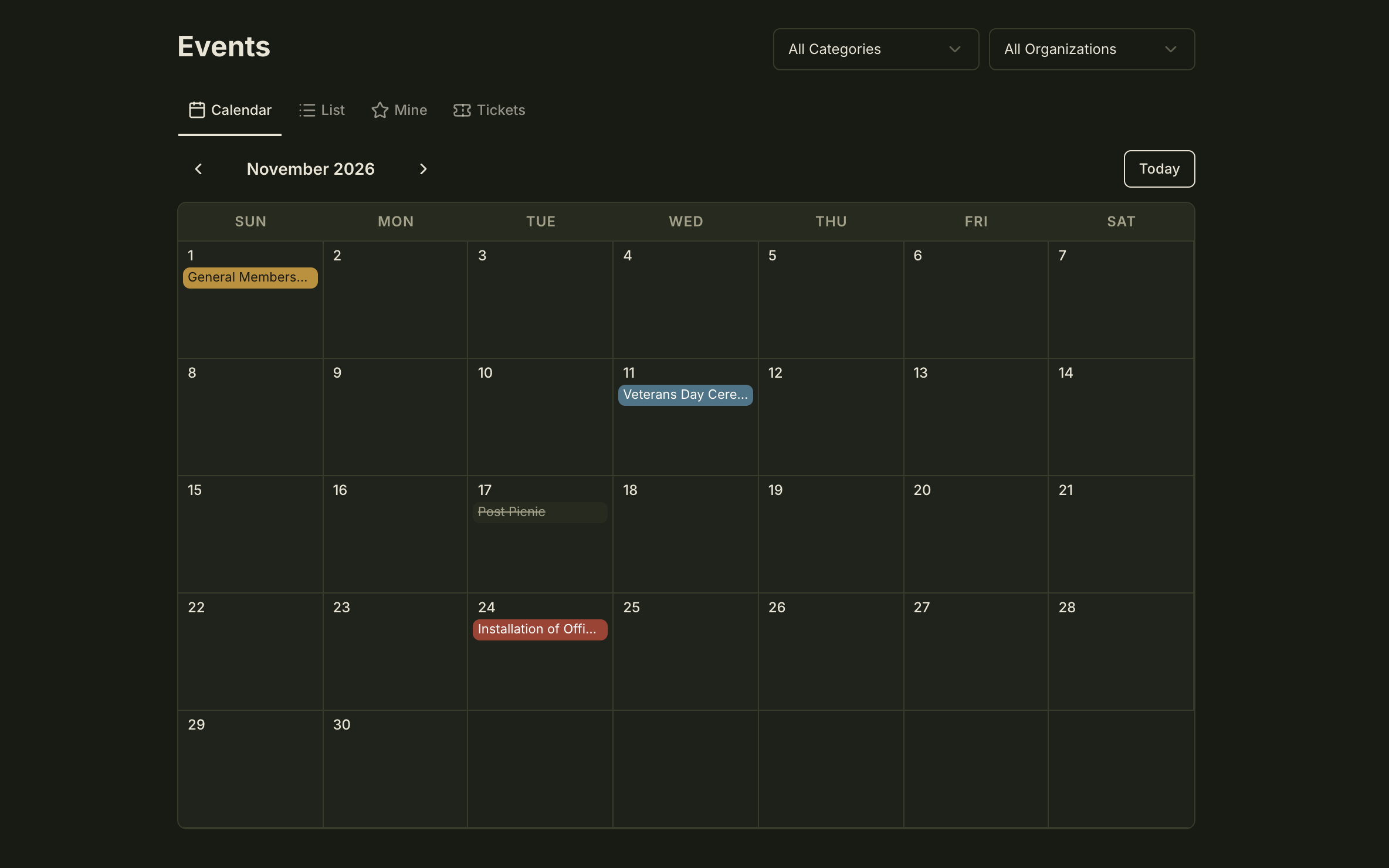
One month of a club's calendar, each event on its day, color-coded by category. The cancelled one is still there, greyed and struck through.Tap the image to open it full size. Events without tickets.
One button and a member is going: their name joins the attendee list, with their guests where the event allows them, up to any limit it sets. The event downloads as a file for their own calendar. Your organization decides which member types can create events of their own.
Tickets priced by member type.
Turn on ticketing for an event and each member type can carry a seat price of its own. A buyer takes one seat for themselves, priced by their member type, with guest seats and other add-ons on the same order. A member type with no seat cannot buy one. Buy a ticket for another member and it is issued to them, priced by their member type rather than the buyer's.
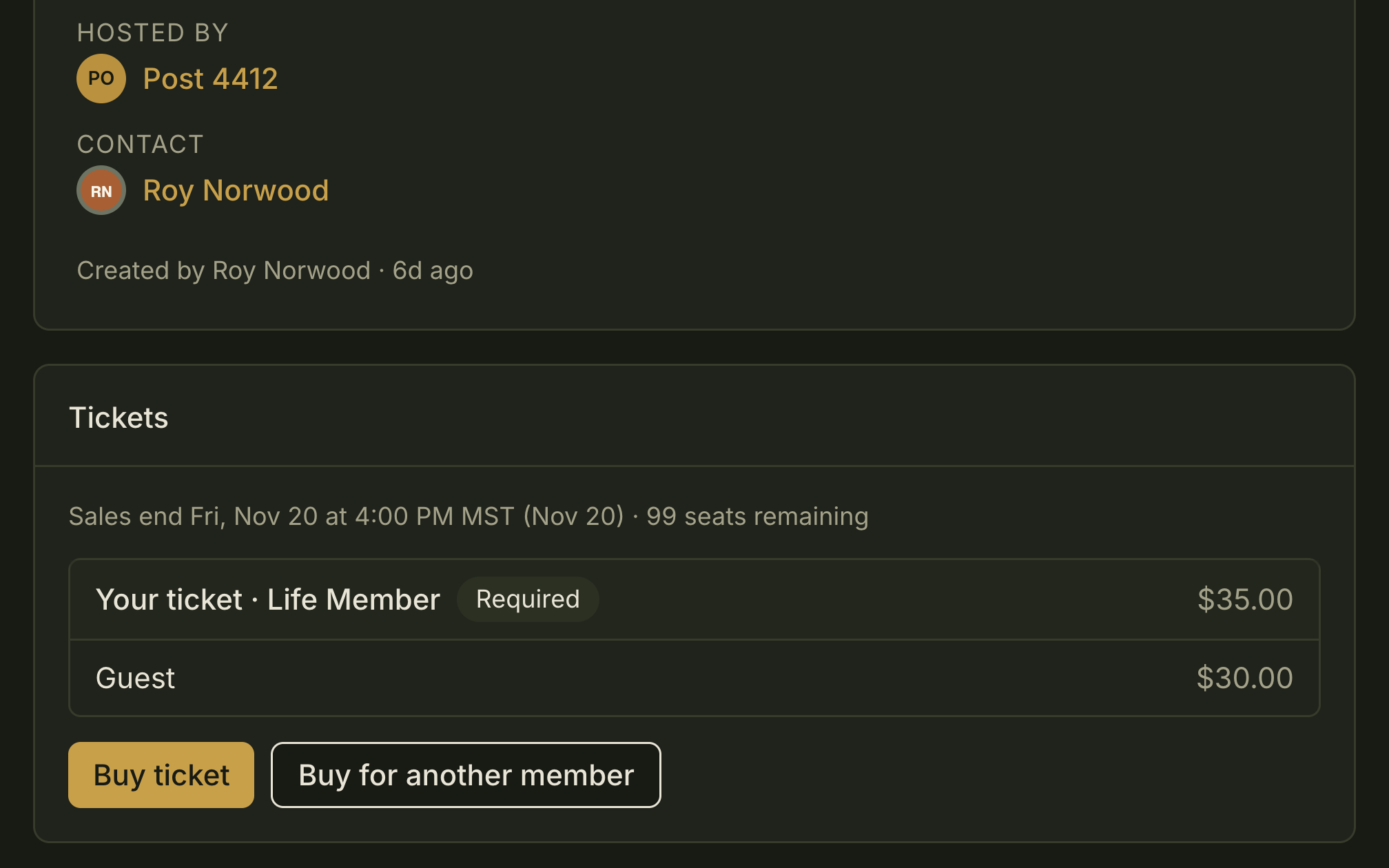
A paid event before a member buys: their own seat, priced by their member type, and a line for a guest.Tap the image to open it full size. One code for the party.
The ticket page carries one QR code for the ticket holder and their guests. Tickets save straight to Apple Wallet and Google Wallet from the ticket page. The pass carries the ticket's check-in code, as the QR on the ticket page does, and either is scanned at check-in.
The door follows the seat.
Turning on ticketing, setting the prices and scanning at the door are the Comptroller's job, and the Comptroller is a designation on an officer role, so the job passes with the seat. For a single event, the Comptroller can add members as scanners, and a scanner's access is scanning at that event.
It is the installation banquet, and the new officers' families are at the door.
At the door.
Open the scanner from the event page and point the camera at the code. A card shows the holder's name and the size of the party, and one tap checks the party in, with the time and the scanner's name. The count at the door rises with each person checked in. Scan the same code again, and the card says the party is already in, with who checked them in, and when.
Their ticket page says so.
Once the party is in, the member's own ticket page says they were checked in, when, and by whom.
Check in a party at the door
- Time and scanner recorded
- Counted at the door
- Their ticket page shows when, and who let them in
The Chain of Command
Authority follows the seat, not the person.
The seat changes hands. The access goes with it.
Every membership change — joining, a type change, a transfer, a deactivation, required paperwork — runs through the approval chain your organization configures, only along paths it has defined. Members start these requests themselves. They route up the chain of command with the conversation attached.
Admin scope (Club, Org or Local), the Comptroller designation and the Election Conductor designation are properties of the officer role. When the seat changes hands, so does the access.
The paths are yours.
Your organization defines which member-type changes are legal and who approves them.
The Comptroller.
A money-only designation: ticketing, the store and refunds, without touching the roster.
Profile permissions, per field.
Down to the Extra Info fields your organization defines.
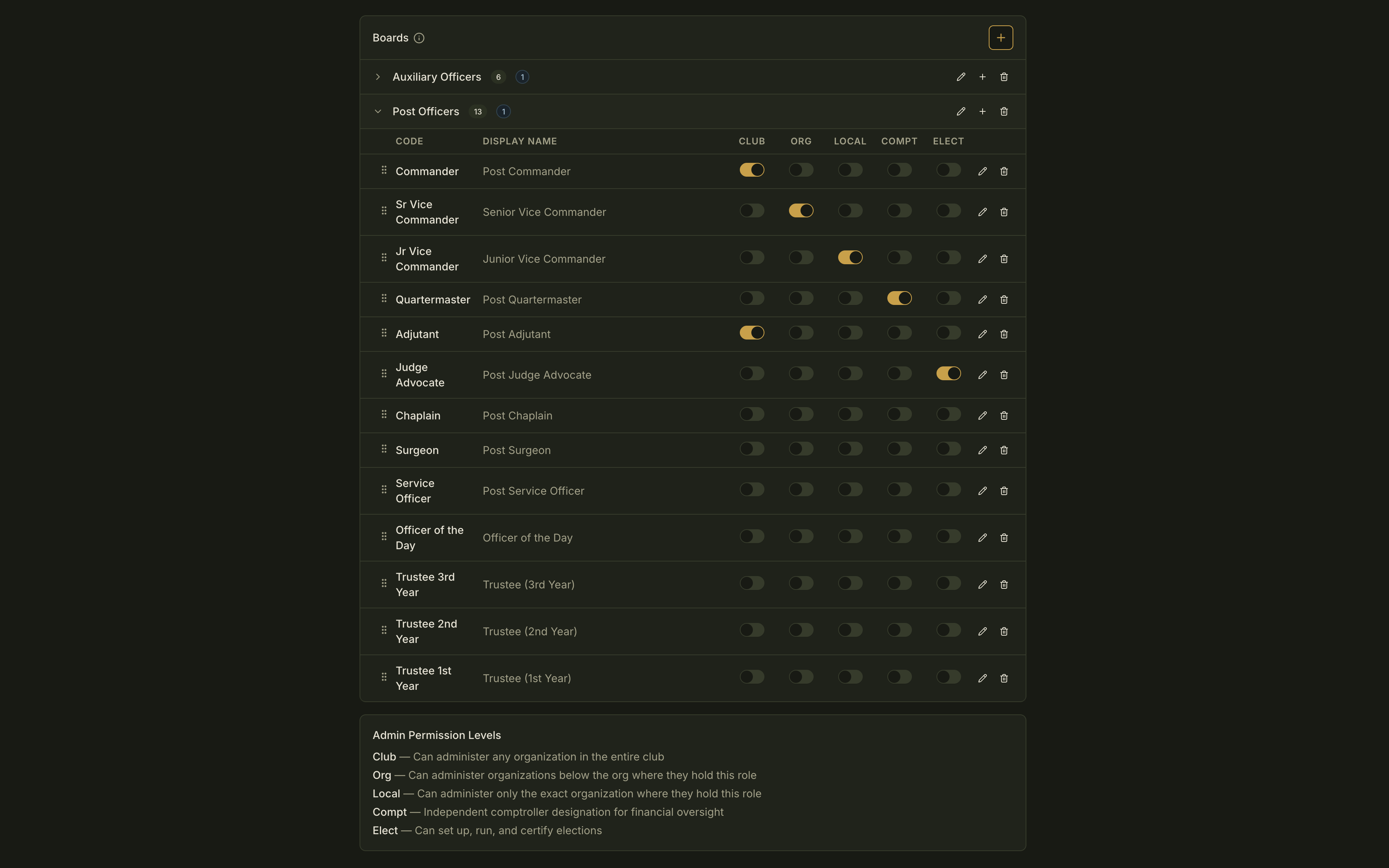
Dues and the store, to the same standard.
fellos is the premium platform for organizations that take their own governance seriously. The rest of the product is built to the standard of the six parts above.
A store with a real order lifecycle.
Dues by member type.
Each member type carries its own amount.
Your organization's own Stripe account.
Money goes straight to the club, and card numbers never touch fellos.
Your own domain, branding, theme and public pages.
A public manual, in four role guides.
In an officer’s words
Iron Rockets MC, in their International President’s words
“On ClubExpress, keeping the org chart accurate was a permanent admin job. Every officer change, every chapter transfer, every member type update came back to us to fix by hand. Fellos gave members workflows to do it themselves, and it stays correct. Elections and event calendars are built in instead of run off other products. The continuous social feed of everything going on in the club combined with the fact that the site works like an app on phones keeps our members engaged.”
Blank Man
International President, Iron Rockets MC
Choose the serious option.
Rehearse your next election before it counts. A test election runs the whole process — nominations, ballot, certification — hidden from members, and moves no one. Start there.